A statement of account lets you see where your tax account stands with SARS. You can request one directly on SARS efiling.
This is a GUIDE for the process for both companies and individuals for Income Tax only. The process for other Tax Types might be similar but may have more or less and different steps.
Step 1: Select “SARS” Correspondence
Log in to efiling.
On the front page, on the left hand side, select SARS Correspondence.

Step 2: Request “Historic IT Notices“
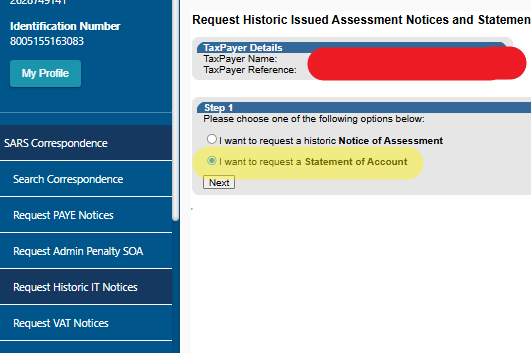
Select Request Historic IT (Income Tax) Notices. Your screen may not show every option listed here, as the options you see can differ from one taxpayer profile to the next.

Step 3: choose the statement of account option
Click on I want to request a Statement of Account.
Step 4: Enter the date or use the 6 months to date
Enter the date in the field provided.
If you want a more recent (and easier) statement of account, tick the 6 months to date option. This will give you 6 months going back from the date you request it eg: today

Step 5: To open your statement
Click on the link that reads “Click here to view your Statement of Account.”

Your statement will open in a separate window. The top section will look like the image below

Quick summary
- Select SARS Correspondence on the front page.
- Select Request Historic IT Notices.
- Click “I want to request a Statement of Account”.
- Enter the date.
- Click the link to view your statement in a new window.
Notes
- For the purposes of this article, the name and other private information have been blocked out. This information will be visible to you as your own.
- In step 3, You may or may not see the full list shown here. This depends on what tax types you or your company are registered for.
- When you request anything on Efiling, there will be an alert sent to the registered phone number via SMS and email.
- By requesting this report, you are not changing anything on Efiling. You can make mistakes and it will not change details. PLEASE be careful with this though. There are ALWAYS “back” or “cancel” buttons.
- This is just a guide and does not constitute taxa advice. I cannot guarantee the website will stay this way. Please seek a registered tax practitioner advice if you are unsure about ANYTHING.